Whole Foods Receipt Example
See exactly what a Whole Foods receipt looks like — store number, Prime member discount line, department codes, PLU codes, 365 brand items, Amazon Prime savings total, tax, and payment. Use the editable template to recreate or customize one.
See what a real Whole Foods receipt looks like with all fields explained — store number, Amazon Prime member discounts, department labels for produce and bulk, PLU codes, 365 brand items, total Prime savings, tax, and payment. Use the editable template to recreate a Whole Foods receipt.

Choose
Whole Foods Receipt Example selected

Customize
Fill in your details

Download
Save or share receipt
Edit the details once and the preview updates instantly.
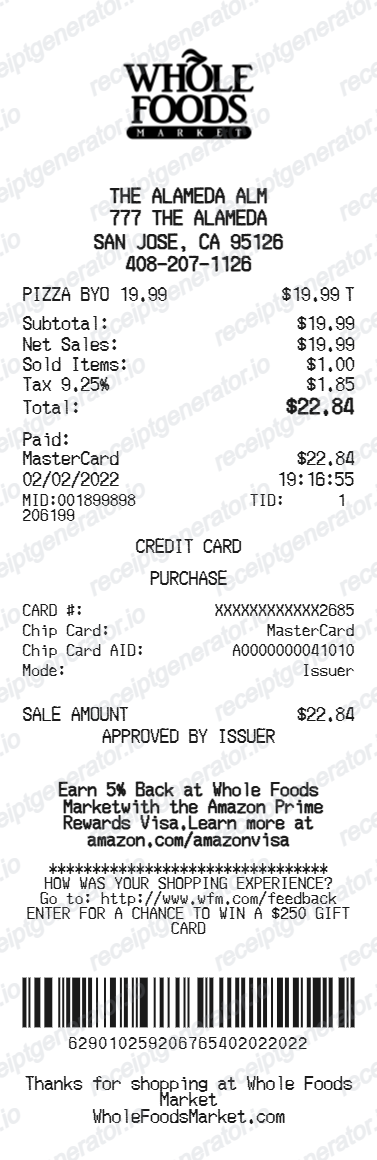
Quick summary
Whole Foods receipt example overview
A standard Whole Foods receipt includes the store name and number, cashier name, date and time, item rows with PLU codes and department labels, Amazon Prime savings lines per item, total Prime savings, subtotal, itemized tax, total, and card payment approval code.
What's on a Whole Foods Receipt?
A Whole Foods receipt uses a grocery thermal format organized by department, with clear Amazon Prime savings lines and department codes that distinguish produce, bulk, and prepared food purchases. Understanding each field helps you verify savings, track organic food spending, or document grocery expenses.
Store header
Whole Foods Market store name, full address, city, state, zip, phone number, and store number printed at the top of the receipt.
Transaction details
Cashier name, register number, transaction date, and time. Some locations also print the terminal ID for self-checkout transactions.
Item rows with PLU codes and department labels
Each item shows the description, PLU code or barcode number, department label (such as Produce, Bulk, Deli, or Prepared Foods), quantity or weight, regular price, and a Prime savings line for any discounted items. 365 brand items are labeled accordingly.
Amazon Prime savings total
A summary line at the bottom of the item list shows the total Amazon Prime savings earned across all qualifying items during the transaction. This total reflects all individual Prime discount lines combined.
Subtotal, tax, and payment
Subtotal before tax, itemized tax lines by category (grocery, prepared food, and other taxable items are often taxed at different rates), and total amount charged. Payment method, masked card number, and approval code are printed at the bottom.
See what a Whole Foods receipt looks like
Edit the layout, watch it update live, then print, download PDF, or email.
See a real Whole Foods receipt format
Preview a complete Whole Foods receipt layout with store header, department labels, PLU codes, Prime member savings lines, total Amazon Prime savings, tax, and payment details.
Editable field-by-field
Edit any field in the Whole Foods receipt example — store number, item rows with PLU codes and departments, Prime discount lines, tax, and payment — to match your actual purchase.
Download as PDF
Export the completed Whole Foods receipt example as a clean PDF for organic grocery expense records, health spending accounts, or reimbursement documentation.
Mobile-friendly editor
View and edit the Whole Foods receipt example from desktop, tablet, or phone without any app download required.
Looking for a Whole Foods Receipt Example?
This Whole Foods receipt example shows the standard grocery format — store header, department labels, PLU codes, item rows with Prime member discounts, total Amazon Prime savings, tax, and payment approval code. Use the generator to build your own editable Whole Foods receipt.
Verify a receipt format
Use this Whole Foods receipt example to check that a receipt has the correct store number, PLU codes, Prime savings lines, and payment approval code.
Understand receipt fields
Learn what PLU codes, department labels, Amazon Prime savings lines, and 365 brand callouts mean on a standard Whole Foods receipt.
Recreate a lost Whole Foods receipt
Use the receipt example as a reference to fill in the generator with your store, item rows, Prime discounts, and payment details when the original receipt is missing.
Organic grocery expense records
Use a Whole Foods receipt example as a reference when documenting organic food or specialty grocery purchases for health spending accounts, nutrition tracking, or expense reports.
Whole Foods Receipt Formats
Whole Foods receipts follow the same grocery thermal format for all purchases, with additional Amazon Prime savings lines for Prime members and PLU codes for bulk and produce items.
Standard Whole Foods Receipt
A Whole Foods receipt with department labels, PLU codes, item rows, subtotal, itemized tax by category, and card payment approval code.
Amazon Prime Member Receipt
A Whole Foods receipt for Prime members showing individual Prime savings lines per item and a total Amazon Prime savings summary at the bottom.
Bulk and Produce Receipt
A Whole Foods receipt for bulk bin and produce purchases showing PLU codes, weights, price-per-pound rates, and department codes for each item.
Grocery Receipt Guides
Read supporting guides for organic grocery receipts, produce expense records, and health spending account documentation.
Grocery Receipt for Reimbursement
See what expense teams require from a grocery receipt for reimbursement approval.
Read guideLost Grocery Receipt
How to recover or recreate a grocery receipt when the original is lost or not saved.
Read guidePrintable Grocery Receipt PDF
Tips for exporting and using printable receipts for records and expense reports.
Read guideHow to Get a Grocery Receipt
Learn where grocery receipts usually come from and which details matter most for budgeting or reimbursement.
Read guideGrocery Receipt Template
Use the right fields and structure when organizing a cleaner grocery purchase record.
Read guideRelated Other Receipt Templates
More receipt examples showing the format, fields, and layout of popular grocery and retail store receipts.
Whole Foods Receipt Example FAQ
Common questions about what a Whole Foods receipt looks like, how Amazon Prime discounts appear, what PLU codes mean, and how to recover or recreate a lost receipt.
A Whole Foods receipt shows the store name, address, store number, and phone number at the top, followed by the cashier name, register number, date and time, and item rows grouped by department such as Produce, Bulk, or Prepared Foods. Each item shows a description, PLU or barcode number, quantity or weight, price, and any Prime member discount applied. The receipt totals all Prime savings at the bottom before showing subtotal, tax, and payment.
A Whole Foods receipt includes the store name and number, cashier name, register number, date and time, item rows with PLU codes or barcodes, department labels, quantities or weights, regular prices, Prime member savings lines, 365 brand item callouts, subtotal, tax breakdown by category, total Prime savings, and payment method with approval code.
365 brand items are Whole Foods Market's private-label products, identified by the '365 by Whole Foods Market' label on the receipt. These products are typically lower-priced alternatives to name-brand organic and natural products and are available across nearly every department. The 365 brand label on the receipt helps distinguish store-brand items from third-party brands for budgeting and reimbursement purposes.
Add the store name, purchase date, line items, totals, tax, payment method, and any optional notes you need on your Whole Foods Receipt Example template.
Amazon Prime member discounts appear as a savings line directly below each qualifying item, showing the discount amount deducted from the regular price. At the bottom of the receipt, Whole Foods prints a total Amazon Prime savings line summarizing all individual Prime discounts applied during the transaction. You must have an active Amazon Prime membership linked to your account to receive these savings.
PLU (Price Look-Up) codes are four- or five-digit numbers assigned to fresh produce and bulk items that are weighed or sold loose at Whole Foods. These codes appear next to the item description on the receipt and are used by cashiers and self-checkout systems to identify items without a barcode. PLU codes help verify that the correct item was rung up, especially for specialty produce or bulk bin products.
Use the Whole Foods Receipt Generator to enter the store number, item rows with PLU codes and department labels, Prime member discounts, tax, and payment details. Preview the result and export a PDF that matches the standard Whole Foods receipt format. Amazon Prime members can also find digital Whole Foods receipts in the Amazon app under 'Account and Lists' in the Whole Foods section.
Both. You can use these templates for reimbursements, bookkeeping prep, and internal documentation workflows.
Receipt Generator · Receipt Maker · 200+ Free Templates
Need to recreate a Whole Foods receipt?
Use the editable Whole Foods Receipt Generator to enter store details, PLU codes, department labels, Prime savings, and payment information, then export a clean PDF.