Mac Receipt Generator
Create a Mac purchase receipt with model, chip, RAM, storage, serial, AppleCare, accessories, taxes, and payment details. Export a clean PDF quickly.
Create a Mac-style receipt with model, chip, storage, AppleCare, taxes, and payment details. Download a PDF for warranty or asset records.

Choose
Mac Receipt selected

Customize
Fill in your details

Download
Save or share receipt
Edit the details once and the preview updates instantly.
Quick summary
Mac receipt template overview
Use this Mac receipt generator to create authentic itemized receipts with editable products, tax calculations in $, and printable PDF export.
What Is on a Real Mac Receipt?
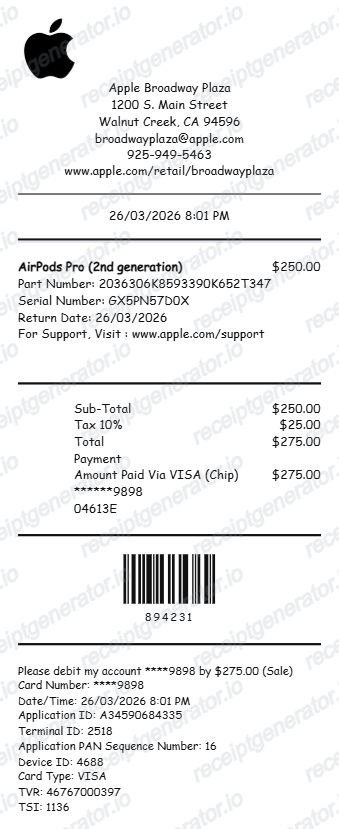
Apple's Mac invoices are unusually detailed for a retail receipt because every machine is serialized and configuration-specific. A convincing replacement copy should match these fields.
Full model and configuration line
Apple prints the exact model name plus its configuration - chip, unified memory, storage, and color - along with Apple's part number for that build, so a MacBook Pro line reads far more specifically than just the product name.
Serial number on the invoice
Macs bought from Apple include the device serial number on the invoice. That serial links the machine to its warranty and AppleCare coverage, which is why finance and IT teams expect it on proof of purchase.
AppleCare+ as a separate line
AppleCare+ never merges into the hardware price - it appears as its own line item with its own cost, whether billed upfront or as a recurring plan.
Invoice created at shipment, not at order
Apple generates the invoice only after the Mac ships or is picked up, then exposes a View Invoice link in the order details. The order confirmation email is not the invoice.
Tax based on delivery or store location
US Apple receipts show one combined sales tax line calculated from the ship-to address or the store's location. Business buyers in VAT and GST countries receive a tax invoice with registration details instead.
Emailed receipts for in-store purchases
Apple Stores email the receipt to your Apple Account address by default, with a printed copy optional - so a real in-store Mac receipt usually exists in your inbox even if no paper survived.
Create a print-ready Mac purchase receipt
Edit the layout, watch it update live, then print, download PDF, or email.
Live Mac receipt preview
Watch the receipt update as you add Mac configuration and accessory details.
One-click print
Print your Mac receipt directly from your browser.
Download as PDF
Export a professional Mac purchase receipt as a PDF.
Desktop-friendly editor
Build Mac receipts quickly with a live preview optimized for larger purchases and itemized setups.
Get Your Original Mac Receipt First
Apple keeps invoices in your Apple Account: open your order history on apple.com or in the Apple Store app, select the order, and choose View Invoice to download the PDF once the Mac has shipped or been picked up. For in-store purchases, Apple can often retrieve the receipt from the serial number, approximate date, or payment card. Use this template when the original is unavailable - a Mac bought under someone else's Apple Account, a reseller purchase, or a receipt email that is long gone.
Business reimbursement
Generate a Mac receipt for company hardware reimbursement or accounting records.
Warranty registration
Document Mac purchase details for AppleCare+ and warranty support.
Insurance documentation
Keep a complete Mac receipt for insurance claims involving theft, damage, or loss.
Resale proof of purchase
Provide a professional receipt when selling a Mac device or workstation.
Mac Receipt Formats
Choose the Mac receipt layout that best matches your computer purchase and documentation needs.
Standard Store Receipt
Standard Mac till receipt layout with item lines, subtotals, tax breakdown, and payment confirmation.
Itemized Detailed Receipt
Expanded layout with product SKU codes, quantity unit rates, discounts, and store register metadata.
Digital Order & Invoice
Clean electronic invoice format with customer reference numbers, transaction IDs, and payment method details in $.
Related Guides
Explore related guides to understand the receipt details, lookup steps, and documentation workflows.
How to Read a MAC Cosmetics Order Receipt
A field-by-field walkthrough of the MAC order confirmation email, from order number to Back-to-MAC credit and MAC Pro points confirmation.
Explore How to Read a MAC Cosmetics Order ReceiptBack-to-MAC Program: How Recycling Credits Appear on Receipts
How the Back-to-MAC recycling program works, how credits are logged on your receipt, and how to redeem six empty containers for a free lipstick.
Explore Back-to-MAC Program: How Recycling Credits Appear on ReceiptsMAC Pro Card Benefits and Receipt Documentation
How MAC Pro loyalty points are earned, how they appear on your MAC receipt, and how to use them for professional discounts and early collection access.
Explore MAC Pro Card Benefits and Receipt DocumentationHow to Find an Apple Receipt
Learn where Apple order and store receipts usually come from and which device details matter most.
Explore How to Find an Apple ReceiptiPhone Receipt Template
Review which device, serial, and payment fields belong on an Apple-style phone receipt record.
Explore iPhone Receipt TemplateMac Receipt Template
See which product and payment details make a device purchase record easier to review later.
Explore Mac Receipt TemplateRelated Other Receipt Templates
More free receipt templates for electronics and retail expense records.
Mac Receipt FAQ
Common questions about creating a Mac purchase receipt for business records, warranty support, and asset documentation.
Choose the Mac receipt template, add the device model such as MacBook Pro, MacBook Air, iMac, or Mac mini, then include chip, RAM, storage, serial number, AppleCare+, taxes, and payment details. Preview and download as PDF.
Yes. Mac receipts are commonly used for business equipment reimbursement, bookkeeping records, and remote-work setup documentation.
A real Apple invoice for a Mac shows the order number, the full model and configuration line (chip, memory, storage, color) with Apple's part number, the device serial number, AppleCare+ as its own line if purchased, sales tax based on the delivery or store location, the payment method, and the total.
Add the store name, purchase date, line items, totals, tax, payment method, and any optional notes you need on your Mac template.
This tool creates an editable Mac style layout for documentation. It is not issued by the original merchant or brand system.
Yes. Add USB-C hubs, Magic Mouse, Magic Keyboard, displays, chargers, sleeves, and other accessories as separate line items.
Sign in to your Apple Account order history at apple.com or in the Apple Store app, open the order, and choose View Invoice to download the PDF - the invoice becomes available once the Mac ships or is picked up. For in-store purchases, Apple can often retrieve the receipt using the serial number, approximate purchase date, or the payment card used.
Usually not if you bought it directly from Apple - coverage is tied to the serial number, and you can check status at checkcoverage.apple.com. Apple asks for proof of purchase when the purchase date on file looks wrong or the Mac came from a third-party reseller, so keep the reseller invoice for those machines.
Both. You can use these templates for reimbursements, bookkeeping prep, and internal documentation workflows.
Yes. The generator works on mobile and desktop so you can edit details, preview changes, and export from either device.
Receipt Generator · Receipt Maker · 300+ Free Templates
Create your Mac receipt
Use the editable Mac receipt generator to add items, tax totals, and payment details, then export a clean PDF.