How to Get a Lyft Receipt

Ready to create your own? Use our free receipt generator — no account needed.
Generate Lyft Receipt →On this page
Need a Lyft receipt? Start with the app and your email before doing anything else. Most Lyft receipts are still recoverable after the trip, and the easiest path is usually ride history, not manual reconstruction.
Quick Answer
To get a Lyft receipt, open the Lyft app, find the ride in your trip history, and review the trip details there. If you still cannot find it, search your email for the ride receipt Lyft sent after the trip.
Lyft's own help documentation says receipts are emailed after payment and that the Ride History tool can export individual ride receipts or ride reports, so the app and receipt email should be your first stop:
Important
If you need the receipt for reimbursement, use the official Lyft receipt first whenever possible. A personal backup should only come after you confirm the original ride details.
Where Lyft Receipts Usually Live
Most Lyft receipts are available in two places:
- Lyft app ride history
- Email receipt sent after the trip
That covers the majority of receipt recovery cases.
If the trip was booked normally through your Lyft account, one of those two sources usually has the information you need.
How to Get a Lyft Receipt From the App
The Lyft app should be your first stop because it is tied directly to your ride history.
Basic process:
- Open the Lyft app
- Go to your ride history or past rides
- Select the trip you need
- Open the trip details
- Review the fare breakdown and receipt-related information
This is the easiest way to recover:
- recent rides
- airport transfers
- business rides
- conference and event transport
- personal spending records
If you ride with Lyft regularly, the app is usually faster than digging through your inbox.
Lyft's own help docs say receipts are emailed after payment, and the Ride History tool lets you view or export individual receipts or send a ride report for multiple rides.
How to Find a Lyft Receipt in Email
Lyft normally emails a ride receipt after the trip is completed.
If you cannot find the receipt right away, search your inbox for:
Lyft receiptLyft trip- the date of the ride
- the trip total
Also check:
- spam or junk folders
- Promotions or Updates tabs
- a second email account if you recently changed addresses
This step matters because many “missing” receipts are just buried in email, not actually lost.
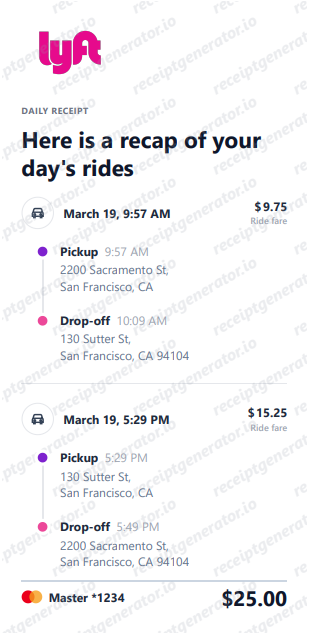
What a Lyft Receipt Should Include
A useful Lyft receipt usually includes:
- ride date
- pickup and drop-off details
- fare or charge breakdown
- tip if applicable
- total amount charged
For reimbursement and travel documentation, those are usually the fields finance or admin teams care about first.
If you are building a clearer record for your own files, you may also want to save:
- ride type
- any service or surcharge details
- payment reference
Lyft Receipt for Business Reimbursement
Lyft receipts are commonly used for:
- business travel
- airport rides
- client meetings
- event or conference transport
- employee reimbursement
In most cases, the finance team mainly wants to confirm:
- when the ride happened
- what the ride was for
- how much it cost
That is why the official Lyft receipt is usually enough for standard expense reporting.
Related: Lyft Receipt for Reimbursement
What to Do If the Lyft Receipt Is Missing
If you cannot find the receipt immediately:
- Check the Lyft app ride history
- Search the email connected to your Lyft account
- Confirm you are using the correct account
- Match the ride by date and amount if you have a card statement
The most common reason people think the receipt is gone is that they are checking the wrong email or overlooking the ride history in the app.
If the ride details are still missing after that, gather the verified information before creating any personal backup record.
If the original receipt is missing, start here next: Lost Lyft Receipt: How to Recover It
Lyft Receipt vs Lyft Ride History
The ride history helps you locate the trip. The receipt is the cleaner documentation layer.
Think of it this way:
- Ride history helps you find the correct trip
- Receipt is what you save, submit, or archive
That difference matters most when the ride is for:
- reimbursement
- recordkeeping
- client billing support
- travel documentation
Need a Structured Lyft Receipt Record?
If you have verified the ride details and want a clean record for your files, use the Lyft Receipt Generator to organize the trip information into a clear receipt-style layout.
That works best for personal recordkeeping and structured documentation after the original ride details are confirmed.
Open the Lyft Receipt Generator
Create a structured Lyft-style receipt using the verified details from your trip.
Related Guides and Tools
- Lost Lyft Receipt: How to Recover It
- Lyft Receipt for Reimbursement
- Lyft Receipt Template: What to Include
- Printable Lyft Receipt PDF
- Lyft Receipt Generator
- Uber Bill vs Receipt: How to Download the Right Copy
- How to Get an Uber Receipt: From the App, Email, or a Backup Copy
- Taxi Receipt Generator
- Taxi and Airport Ride Receipt Generator
Final Takeaway
If you need a Lyft receipt, check the app and email first. In most cases, the original ride record is still available. Once you confirm the trip details, you can save or organize the receipt for reimbursement, travel records, or personal use.
Official Lyft References
FAQ
Open the Lyft app, go to your ride history, select the trip, and review the trip details or receipt information from there.
You can also search your email for Lyft ride receipts sent after completed trips.
Yes. Lyft usually emails a receipt after each completed ride to the email address on the account.
If you cannot find it, check spam, promotions, or the wrong email account.
Yes. Older trip receipts can usually be found through your ride history in the Lyft app.
If the email is missing, the app history is the next place to check.
A useful Lyft receipt should include the date, pickup and drop-off, fare details, and amount charged.
That is usually enough for standard expense reporting and travel documentation.
Start with the Lyft app and your email history. If the original cannot be recovered, organize the verified ride details before creating any personal backup record.
Official receipts should come first whenever possible.
Yes. Lyft receipts are commonly used for business travel, airport transfers, client meetings, conferences, and general rideshare reimbursement.