Five Below Receipt Generator
Create a Five Below-style receipt with store details, item rows, item codes, tax, total, card payment details, barcode, and footer metadata. Preview live and export a PDF.
Create a Five Below-style receipt with editable store details, item rows, item codes, subtotal, tax, total, and card payment information. Download a clean PDF for purchase records or expense documentation.

Choose
Five Below Receipt selected

Customize
Fill in your details

Download
Save or share receipt
Edit the details once and the preview updates instantly.
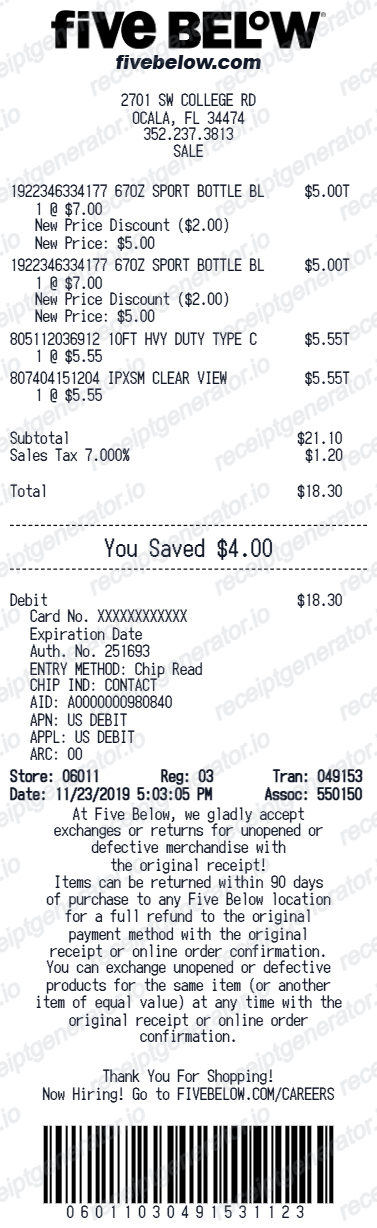
Quick summary
Five Below receipt template overview
Use this Five Below-style receipt template to build a compact discount retail receipt with store details, item rows, product codes, subtotal, tax, card payment block, barcode, and footer metadata.
What Is on a Real Five Below Receipt?
Five Below receipts are classic compact thermal slips from a value retailer built around a $1-$5 price point. A credible copy should reflect the chain's real pricing structure and return rules.
Store header with store number
Five Below operates well over a thousand stores across the US, and each receipt is headed by the location's store number, street address, city, state, zip, and phone - the details used to identify which store handled a return.
Prices clustered between $1 and $5
The chain's core assortment - toys, tech accessories, candy, beauty, room decor, and seasonal goods - is priced at $5 or less, with the Five Beyond section carrying items above $5. Item lines dominated by price points like $1.00, $3.00, and $5.00 are the signature of a real Five Below receipt.
Item codes next to short names
Each line prints an abbreviated item name with a numeric item or UPC code and the price. The item count in the footer must match the number of lines - one of the first things checked when a receipt is scanned for a return.
Subtotal, tax, and card payment block
Sales tax follows the local rate of the store's jurisdiction. Card purchases add a payment block with the card brand, masked number ending in the last 4 digits, approval code, and transaction reference.
Barcode for the 90-day return window
Five Below accepts returns within 90 days at any location for a full refund to the original payment method - with the original receipt or online order confirmation, and the original card present. The receipt barcode is what the register scans to pull the transaction back up.
Footer metadata line
The bottom of the slip records the item count, date and time, store, register, and transaction number - the combination that uniquely identifies the sale in Five Below's POS system.
Create a print-ready Five Below receipt
Edit the layout, watch it update live, then print, download PDF, or email.
Live Five Below receipt preview
Watch the receipt update instantly as you edit item rows, product codes, totals, card details, and footer text.
Item code editor
Add product or UPC codes alongside item names for a receipt layout that matches the Five Below format.
Download as PDF
Export a clean Five Below-style receipt PDF for purchase records or expense documentation.
Mobile-friendly editor
Create and edit Five Below receipts from desktop, tablet, or phone.
Get Your Original Five Below Receipt First
If you shopped online, your order confirmation email is the receipt, and Five Below's customer relations team accepts receipt or invoice requests through its support site. For in-store purchases, ask the store where you paid - bring the date and the card used, since there is no loyalty account that stores your receipts. Use this template when the original is unavailable - a faded thermal slip, a deleted confirmation email, or a cash purchase with no lookup trail.
Personal purchase records
Document a Five Below shopping trip with toy, tech, and seasonal item details for personal records.
Lost receipt recovery
Recreate a Five Below receipt when the original was lost or not saved at checkout.
Gift or party supply records
Document seasonal, party, or gift purchases from Five Below for budgeting and expense tracking.
Receipt mockups
Use the Five Below-style layout for demos, training materials, or presentation mockups.
Five Below Receipt Formats
Choose the Five Below-style receipt layout that best matches your retail purchase, gift, or expense documentation needs.
Standard Five Below Receipt
A compact Five Below-style retail receipt with item rows, product codes, and card payment details.
Item Code Receipt
A receipt format with editable item names, UPC codes, taxable markers, and totals.
Seasonal Purchase Receipt
A Five Below receipt for holiday, party, or gift supply shopping with discount totals.
Retail Receipt Guides
Read supporting guides for retail receipts, dollar store records, and expense documentation.
Dollar Tree Receipt for Reimbursement
How discount store receipts are used for expense documentation and reimbursement.
Explore Dollar Tree Receipt for ReimbursementGrocery Receipt for Reimbursement
See what expense teams require from a retail or grocery receipt for reimbursement approval.
Explore Grocery Receipt for ReimbursementRetail Receipt for Expense Reports
See which fields a store receipt needs to qualify for expense report or reimbursement submission.
Explore Retail Receipt for Expense ReportsRelated Other Receipt Templates
More free receipt templates for dollar stores, discount retail, and budget shopping records.
Five Below Receipt FAQ
Common questions about creating, editing, and downloading a Five Below-style receipt for purchase records, expense documentation, and receipt examples.
Open the Five Below receipt generator, edit the store details, item rows, item codes, subtotal, tax, total, card payment details, barcode, and footer metadata, then preview and download as a PDF.
Yes. The barcode value and bottom footer metadata including date, register, and transaction reference details can be customized.
A Five Below receipt is a compact thermal slip with the store name, store number, address, and phone at the top, followed by each item with an item code and price - most between $1 and $5, with Five Beyond items priced higher - then subtotal, tax, and total, the card type with last 4 digits and approval code, a barcode, and a footer line with the item count, date, register, and transaction number.
Add the store name, purchase date, line items, totals, tax, payment method, and any optional notes you need on your Five Below template.
This tool creates an editable Five Below style layout for documentation. It is not issued by the original merchant or brand system.
Yes. The Five Below template supports editable item names alongside product or UPC codes so each entry can be customized independently.
For online orders, the order confirmation email serves as your receipt, and Five Below's customer relations team handles receipt or invoice requests through its support site. For in-store purchases, ask at the store where you bought the items - reprint ability varies, so bring the purchase date and the card you used. Five Below has no loyalty program that stores receipts to an account.
Five Below accepts returns within 90 days with the original receipt or online order confirmation for a full refund to the original payment method - the card used must be present. Without a receipt, stores may still take the return but typically issue store credit instead of a refund, so bringing the receipt (or recreating your purchase records) is worth it.
Both. You can use these templates for reimbursements, bookkeeping prep, and internal documentation workflows.
Yes. The generator works on mobile and desktop so you can edit details, preview changes, and export from either device.
Receipt Generator · Receipt Maker · 300+ Free Templates
Create your Five Below receipt
Use the editable Five Below receipt generator to add item rows, product codes, tax, card payment details, and barcode, then export a clean PDF for your records.