Marshalls Receipt Generator
Create a Marshalls-style receipt with store details, clothing and home item rows, tax, total, card payment details, and return policy footer. Preview live and export a PDF.
Create a Marshalls-style receipt with editable store details, clothing, shoes, and home item rows, subtotal, tax, total, and card payment information. Download a clean PDF for purchase records or expense documentation.

Choose
Marshalls Receipt selected

Customize
Fill in your details

Download
Save or share receipt
Edit the details once and the preview updates instantly.
Quick summary
Marshalls receipt template overview
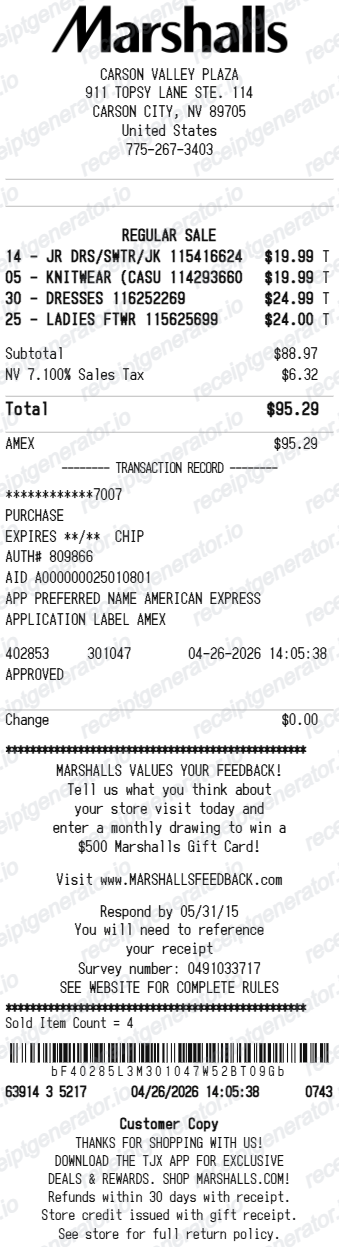
Use this Marshalls-style receipt template to build a complete discount retail receipt with store details, clothing and home item rows, compare-at prices, subtotal, tax, card payment details, and return policy footer.
What Is on a Real Marshalls Receipt?
Before you rebuild a Marshalls receipt, it helps to know what the register actually prints. Marshalls is part of the TJX family, and its receipts follow a consistent structure a credible replacement copy should match.
Store number and transaction header
The top identifies the specific Marshalls location with the store number, address, and phone, plus the transaction date and time and register details - the same details the returns desk uses to match the receipt to a store.
Item numbers with short descriptions
Each item prints with an item number and an abbreviated department-style description at the price actually paid. The compare-at retail price lives on the price tag, so a real receipt shows the Marshalls price, not the crossed-out original.
The 30-day return policy in print
Marshalls' policy is printed with the receipt: merchandise with a register receipt can be returned within 30 days for an exchange or refund in the original form of tender. Past 30 days, or with a gift receipt, the return converts to merchandise credit.
Return code and barcode
The receipt carries a return code and barcode along with the cashier identifier. Associates scan these at the returns desk to validate the transaction, which is why a faded or damaged barcode complicates a return.
No-receipt returns leave an ID trail
Without a receipt, Marshalls issues merchandise credit at the item's current floor price and requires a valid government-issued photo ID, name, address, and signature - and may require the ID again when the credit is spent.
Survey invitation and e-receipt option
A customer survey invitation with a code prints near the footer, and the code expires within days. Select stores also offer e-receipts - choosing Email Receipt on the PIN pad sends a digital copy, the only way an in-store Marshalls purchase gets a searchable record.
Create a print-ready Marshalls receipt
Edit the layout, watch it update live, then print, download PDF, or email.
Live Marshalls receipt preview
Watch the receipt update instantly as you edit store details, item rows, price fields, totals, and payment information.
Compare-at price editor
Show original retail prices alongside Marshalls prices for each item to display discount savings.
Download as PDF
Export a clean Marshalls-style receipt PDF for purchase records or expense documentation.
Mobile-friendly editor
Create and edit Marshalls receipts from desktop, tablet, or phone.
Get Your Original Marshalls Receipt First
Marshalls does not link in-store purchases to an online account, so start with your email: if you chose an e-receipt on the PIN pad at a participating store, the digital copy is in your inbox, and online orders live under order history on marshalls.com. For a purely paper in-store receipt there is no reprint service. Use this template when the original is unavailable - a lost or faded register receipt, or an in-store purchase with no e-receipt.
Clothing purchase records
Document a Marshalls shopping trip with apparel, shoes, accessories, and home item details.
Lost receipt recovery
Recreate a Marshalls receipt when the original was lost, not printed, or needed for a return or exchange.
Expense documentation
Prepare a clothing or home goods receipt for work uniform purchases or household expense records.
Receipt mockups
Use the Marshalls-style layout for demos, training materials, or presentation mockups.
Marshalls Receipt Formats
Choose the Marshalls-style receipt layout that best matches your clothing, home goods, or discount savings documentation needs.
Clothing Purchase Receipt
A Marshalls-style receipt with apparel, shoes, and accessory item rows, tax, and payment summary.
Home Goods Receipt
A receipt showing home decor, beauty, and accessories with compare-at prices and totals.
Discount Savings Receipt
A Marshalls receipt showing original retail price alongside the Marshalls price for each purchase item.
Retail Receipt Guides
Read supporting guides for retail receipts, clothing purchase records, and expense documentation.
Retail Receipt for Reimbursement
Learn which retail store receipt details finance teams usually want for reimbursement and how to keep a cleaner purchase record.
Explore Retail Receipt for ReimbursementRetail Receipt for Expense Reports
See which fields a store receipt needs to qualify for expense report or reimbursement submission.
Explore Retail Receipt for Expense ReportsRelated Other Receipt Templates
More free receipt templates for discount retail, clothing stores, and shopping expense records.
Marshalls Receipt FAQ
Common questions about creating, editing, and downloading a Marshalls-style receipt for purchase records, expense documentation, and receipt examples.
Open the Marshalls receipt generator, edit the store details, item rows, subtotal, tax, total, card payment details, and return policy footer, then preview and download as a PDF.
Yes. Each item row supports both a compare-at retail price and the Marshalls discounted price to show savings on each purchase.
A Marshalls register receipt shows the store number and address at the top with the date and time, item lines with item numbers and short descriptions at the price actually paid, subtotal, tax, and total, the card type with approval details for card payments, a return code and barcode used at the returns desk, the printed 30-day return policy, and a customer survey invitation with a code near the footer.
Add the store name, purchase date, line items, totals, tax, payment method, and any optional notes you need on your Marshalls template.
This tool creates an editable Marshalls style layout for documentation. It is not issued by the original merchant or brand system.
Yes. Add apparel, shoes, handbags, home decor, beauty, accessories, and any other Marshalls-style items with item numbers and individual prices.
Marshalls in-store purchases are not tied to an online account, so there is no purchase-history lookup for register receipts - marshalls.com order history only covers online orders. If you selected an e-receipt on the PIN pad at a participating store, search your email for the copy; otherwise the paper receipt is the record, and the store can only help with returns through its no-receipt process.
Yes, but expect merchandise credit rather than a refund. With a register receipt, Marshalls refunds to the original form of payment within 30 days. Without a receipt - or past 30 days, or with a gift receipt - you receive merchandise credit at the item's current price, and a valid government-issued photo ID, name, address, and signature are required to process it.
Both. You can use these templates for reimbursements, bookkeeping prep, and internal documentation workflows.
Yes. The generator works on mobile and desktop so you can edit details, preview changes, and export from either device.
Receipt Generator · Receipt Maker · 300+ Free Templates
Create your Marshalls receipt
Use the editable Marshalls receipt generator to add clothing and home item rows, compare-at prices, totals, and payment details, then export a clean PDF for your records.